
Binary to Decimal: How to Convert Base 2 to Base 10 Fast
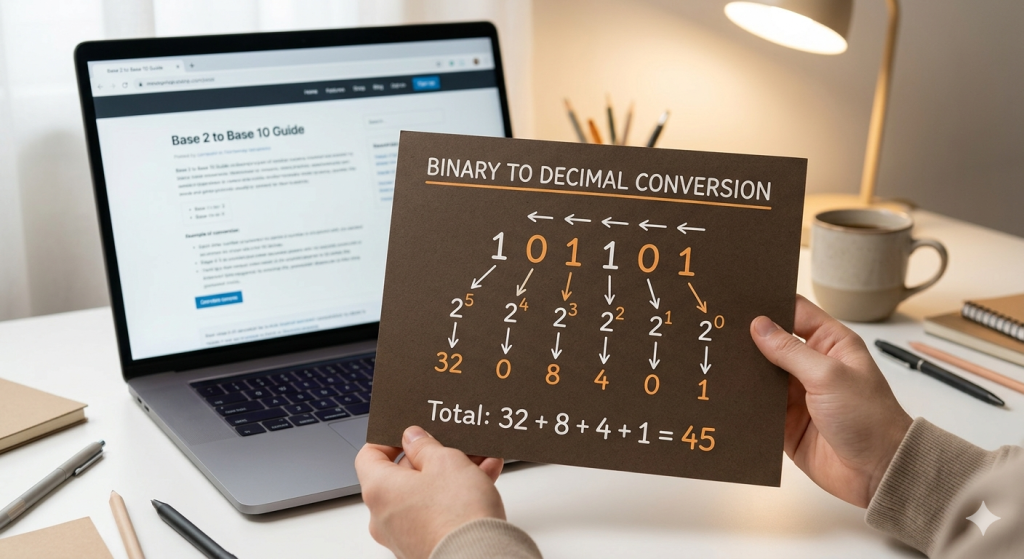

To convert binary to decimal, you calculate the sum of each binary digit (0 or 1) multiplied by $2$ raised to the power of its position. Since binary is a base-2 system, each place value is a power of two. For example, to convert the binary number 1011, you calculate $(1 \times 8) + (0 \times 4) + (1 \times 2) + (1 \times 1)$, which equals 11 in decimal.
Try our Binary to Decimal Converter below to see this in action instantly!
[Interactive Calculator Widget: Input Field | Convert Button | Output Result]
What Is Binary?
We convert binary numbers to decimal because base-10 is the universal standard for human calculation. Whether you are troubleshooting a network IP address, studying computer science, or working with character encoding like ASCII, being able to translate “machine speak” into “human speak” is an essential skill.
Understanding Place Values in Binary
Just like the decimal system has units, tens, and hundreds, the binary system uses powers of 2. You always read these positions from right to left, starting at zero.
Method 1: The Positional Value Method (Step-by-Step)
This is the standard “academic” way to convert binary to decimal. It’s foolproof and shows exactly how the math works.
Step 1: Map the Bits
Write your binary number and list the powers of 2 (1, 2, 4, 8…) underneath it, moving from right to left.
Step 2: Multiply and Add
If the binary digit is 1, keep the value. If it’s 0, ignore it.
Example: Convert 110101 to Decimal
-
$(1 \times 32) = 32$
-
$(1 \times 16) = 16$
-
$(0 \times 8) = 0$
-
$(1 \times 4) = 4$
-
$(0 \times 2) = 0$
-
$(1 \times 1) = 1$
-
Result: $32 + 16 + 4 + 1 =$ 53
Method 2: The Doubling Method (Faster for Mental Math)
If you want to convert binary to decimal without writing out a table, use the Doubling Method. It’s a favorite for competitive programmers.
-
Start with the left-most digit.
-
Multiply your current total by 2 and add the next digit.
-
Repeat until you reach the end.
Example: Convert 1011
-
Start with 1.
-
Double it (2) and add the next digit (0) = 2.
-
Double it (4) and add the next digit (1) = 5.
-
Double it (10) and add the last digit (1) = 11.
How to Convert 4-Bit and 8-Bit Binary Numbers
4-Bit Conversion (The Nibble)
4-bit numbers are small and easy to memorize. The maximum value is 15 ($8+4+2+1$).
-
1100 = $8 + 4 = 12$
8-Bit Conversion (The Byte)
In networking, we often deal with 8-bit strings. The maximum value is 255.
-
10101010 = $128 + 32 + 8 + 2 = 170$
How to Convert Binary Fractions to Decimal
What if there is a dot? Binary fractions use negative powers of 2.
-
The first place after the dot is $2^{-1}$ (0.5).
-
The second is $2^{-2}$ (0.25).
Example: 101.11
-
Integer part (101): $4 + 0 + 1 = 5$
-
Fractional part (.11): $0.5 + 0.25 = 0.75$
-
Total: 5.75
Common Mistakes: Why Students Get the Wrong Answer
-
Starting at $2^1$: The most common error is forgetting that the first position on the right is $2^0$, which equals 1, not 2.
-
Calculating Left-to-Right: If you start your powers of 2 from the left side, the entire calculation will be inflated. Always anchor your “$1$” at the far right.
-
Miscounting 0s: In long strings like
100001, students often miss one of the zeros. Use a finger or pen to track each bit.
Tips for Converting Large Binary Numbers Without a Calculator
When dealing with 12 or 16 bits, don’t panic. Break the number into groups of 4 (nibbles). Convert each nibble to its hex value or decimal sub-total, then combine them. This “divide and conquer” strategy prevents messy .

Recent posts